- Published on
Communication between main app and extension using Darwin Notification
- Authors

- Name
- Omar Elsayed
Introducation
It's been a while since my last article — sorry about that. I've been heads-down building CleanBrowse, one of the few apps I'm genuinely proud of and one I want to keep growing.
Today I want to share one of the more stubborn problems I hit while building it.
Quick context: CleanBrowse ships a DNS proxy extension that inspects every network request leaving your Mac and decides what gets through. It works beautifully — until you change something. Add a blocked domain, flip a rule, update a filter list… and the extension has no idea. It's running in its own process, happily filtering away with a stale copy of your config while the app sits there assuming the job is done.
Which leaves one deceptively simple question: how do you tell a system extension that something changed? 🤔
I'll dig into the details in the next section, but the short version is that the obvious answers don't work, and the one that does took me longer to find than I'd like to admit.
- Introducation
- The Problem I Faced
- Solution using Darwin Notification
- What Is a Darwin Notification?
- Wrapping Up
The Problem I Faced
One of the features CleanBrowse ships with is the ability to add a new domain to your blocklist through this simple UI:
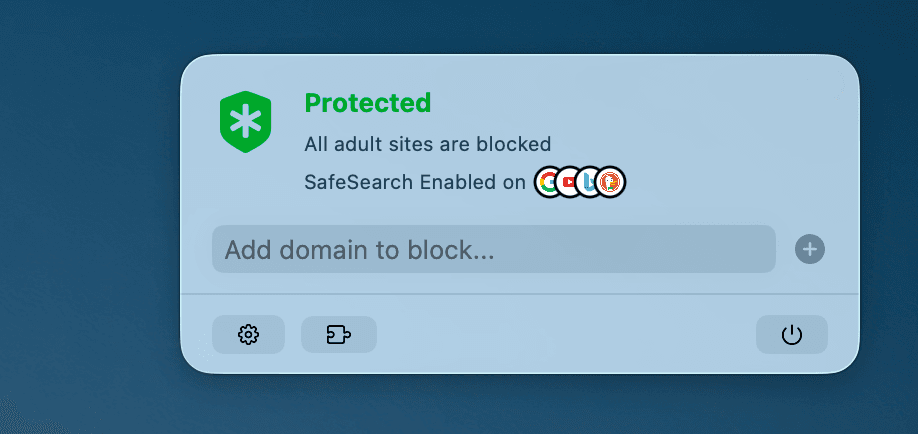
Simple, right? It's not. There are two parts to this problem, and only one of them is easy.
Part one: a shared data source. Both processes — the app and the extension — need to read and write the same blocklist. That part is solved: App Groups handle it cleanly, or on macOS you can drop the sandbox and write to a folder in the user's directory. Pick your poison.
Part two is where it gets interesting. Once the app writes a new domain, the extension needs to know about it. And the extension is a long-running process — it doesn't get a fresh start every time you tap "Add." I could take the lazy path and reload the file on every DNS flow, but that means parsing 250,000+ domains over and over for a list that changes maybe twice a week. That's not a filter, that's a space heater. 😅
So the goal is narrow: reload only when something actually changed.
Now, you may be thinking: just use NotificationCenter. I wish. NotificationCenter only delivers within the process it lives in. Post a notification in the app and the extension hears nothing — different process, different memory, different world. No amount of clever observer setup gets you across that boundary.
So what do we use? 🤔
Solution using Darwin Notification
While brainstorming with Claude and digging around the internet, I found exactly what I needed: Darwin notifications.
In a nutshell, a Darwin notification is a system-wide notification. Not app-wide, not process-wide — system-wide. Any process on the machine can post one, and any process on the machine can listen for it. Your extension, sure. But also a completely unrelated app, a command-line tool, a launch daemon. Everyone's invited.
For my case, that's perfect. Posting from the app looks like this:
public func CFNotificationCenterPostNotification(
    _ center: CFNotificationCenter!,
    _ name: CFNotificationName!,
    _ object: UnsafeRawPointer!,
    _ userInfo: CFDictionary!,
    _ deliverImmediately: Bool
)

// reloadNotification is just a string value
CFNotificationCenterPostNotification(
    CFNotificationCenterGetDarwinNotifyCenter(),
    CFNotificationName(Self.reloadNotification),
    nil,
    nil,
    true
)
Notice the two nils in the middle. That's not me being lazy — the Darwin notify center has no concept of a sender object or a userInfo payload. All you can send is a name, That's it. Which sounds limiting until you realize it's all I need: the notification is a doorbell, and the shared blocklist file is the actual message.
Listening from the extension looks like this:
let observer = Unmanaged.passUnretained(self).toOpaque()

CFNotificationCenterAddObserver(
    CFNotificationCenterGetDarwinNotifyCenter(),
    observer,
    { _, observer, _, _, _ in
        guard let observer = observer else { return }
        let provider = Unmanaged<DNSProxyProvider>.fromOpaque(observer).takeUnretainedValue()
        provider.loadBlocklist()
    },
    DNSProxyProvider.reloadNotification,
    nil,
    .deliverImmediately
)
You're probably wondering what that observer variable is doing. It's a bridge for self.
The callback here isn't a Swift closure — it's a C function pointer. C function pointers can't capture anything, which means no self, no locals, nothing from the surrounding scope. So Core Foundation gives you one void * of scratch space: whatever you pass as observer gets handed straight back to you as the callback's second argument. You convert self into a raw pointer on the way in, and convert it back on the way out. Ugly? A little. Effective? Absolutely.
And the last piece of the puzzle — the part everyone forgets — is tearing it down:
CFNotificationCenterRemoveEveryObserver(
    CFNotificationCenterGetDarwinNotifyCenter(),
    Unmanaged.passUnretained(self).toOpaque()
)
This isn't housekeeping, it's correctness. Look back at how we registered: passUnretained hands over a raw pointer without retaining self. That's deliberate — passRetained would pin the provider in memory forever — but it means the notification center is now holding an address it doesn't own and can't validate.
The problem only shows up in one specific case: self gets deallocated while the observer is still registered. When that happens the stored pointer is dangling, and the next notification calls fromOpaque on freed memory, handing you back a "provider" that no longer exists which then crashs the whole process.
So the fix is simply: never let the registration outlive the object. In our case that's easy, because the provider only goes away when the proxy stops — so we remove the observer in stopProxy(with:completionHandler:):
override func stopProxy(
    with reason: NEProviderStopReason,
    completionHandler: @escaping () -> Void
) {
    CFNotificationCenterRemoveEveryObserver(
        CFNotificationCenterGetDarwinNotifyCenter(),
        Unmanaged
            .passUnretained(
                self
            )
            .toOpaque()
    )
    completionHandler()
}
So by now you're probably asking the real question: what is a Darwin notification under the hood, and why on earth is its callback written in C? 🤔
What Is a Darwin Notification?
Time to look under the hood. CFNotificationCenterGetDarwinNotifyCenter() is a thin Core Foundation wrapper around a much older, much lower-level C API: notify(3), declared in notify.h. That's why the callback is a C function pointer — you're not using a Foundation API that happens to be written in C, you're using a CoreOS-layer primitive that predates Swift, ARC, and probably your career.
The whole thing is built around a system daemon called notifyd. Any process can hand it a name; it fans that name out to every process that registered interest. That's the entire model.
Posting is a single function:
#include <notify.h>

uint32_t notify_post(const char *name);
Receiving is where it gets interesting, because there are five different ways to do it:
uint32_t notify_register_dispatch(const char *name, int *out_token,
                                  dispatch_queue_t queue, notify_handler_t handler);
uint32_t notify_register_check(const char *name, int *out_token);
uint32_t notify_register_signal(const char *name, int sig, int *out_token);
uint32_t notify_register_mach_port(const char *name, mach_port_t *port,
                                   int flags, int *out_token);
uint32_t notify_register_file_descriptor(const char *name, int *fd,
                                         int flags, int *out_token);
A block on a dispatch queue, a shared-memory flag you poll, a UNIX signal, a Mach port, or a file descriptor you read(). Every registration hands back a token, and you're expected to release it with notify_cancel() when you're done — which is precisely the C-level version of the RemoveEveryObserver cleanup we did earlier. Same responsibility, different spelling.
CFNotificationCenterAddObserver on the Darwin center is essentially notify_register_mach_port with a CoreFoundation bow on it. The raw void * context pointer we had to bridge self through? That's just how C callbacks have always worked.
Three constraints matter, and they're all consequences of that design:
No payload. All you send is a name. There's a uint64_t state value you can attach via notify_set_state, but it's typically used as a glorified boolean. If you want to send actual data, you don't — you write it somewhere both processes can read and use the notification to say "go look."
Notifications get coalesced. Multiple posts for the same name in rapid succession can collapse into a single delivery, and a client using notify_check() can't tell how many events actually fired. For CleanBrowse this is a feature: paste 50 domains and you get one reload instead of 50.
Delivery isn't guaranteed. Apple is explicit that notifications may be dropped, particularly under heavy load, Which brings us to the important one.
The Process Has to Be Alive
This is the constraint that decides whether Darwin notifications are right for your problem: notifyd delivers to running processes only. There's no queue, no persistence, no "here's what you missed." If your listener isn't alive at the moment of the post, the notification is gone. It doesn't get replayed on next launch.
For a lot of app-extension setups that's a dealbreaker, a Share Extension or a Widget only exists for a few seconds at a time — you can't build a sync mechanism on notifications that only land during that window.
But CleanBrowse isn't that, The DNS proxy extension is a long-running system extension. From the moment you enable filtering, it stays resident, handling every DNS flow on the machine until you turn it off.
It's the single most reliably-alive process in the whole app. So the one scenario Darwin notifications can't handle — listener asleep when the post happens — is a scenario CleanBrowse structurally doesn't have.
And the edge case is already covered: if the extension does restart for any reason, it loads the blocklist fresh on startProxy, Notifications handle the steady state, startup handles cold boot. Nothing falls through.
Security and Darwin notifications
Now the uncomfortable bit. "System-wide" cuts both ways, and it's worth being honest about it.
Just as any process on the system can register to receive Darwin notifications, any process can send them too, There's no entitlement gate, no code-signing check, no sender identity. notifyd doesn't tell you who posted, and it doesn't ask who's listening.
So concretely, for CleanBrowse:
Anyone can listen for my notification name. A random process learns that app.cleanbrowse.reloadBlocklist just fired. That's it.
It learns that the list changed, not what changed — because there's no payload to steal. The actual data lives behind App Group container permissions, which is a real trust boundary.
The notification is a doorbell, not a mailbox — and that's not just a nice metaphor, it's the security property that makes this safe.
Anyone can post my notification name. Worst case, an attacker triggers a blocklist reload. My extension re-reads a file it was going to re-read anyway.
Spam it hard enough and you've got a mild DoS — which, notably, is exactly the attack class Guilherme Rambo explored when he found iOS system processes that could be knocked over by a sandboxed app posting the right Darwin notification.
Worth reading if you want to see how sharp this edge can get.
The rules that fall out of this are simple, and I'd apply them to any Darwin notification you write:
→ Never let a notification alone authorize anything. Treat it as "something might have changed," then verify against a source you actually control.
→ Make handlers cheap and idempotent. Assume it can fire at any time, from anyone, more often than you expected.
CleanBrowse satisfies all three by accident of design, which is the good kind of accident 😅.
Wrapping Up
The fix was four lines of Core Foundation، Getting there meant understanding that NotificationCenter stops at the process boundary, that a shared container solves data but not timing, and that the answer was sitting in a C header older than most of the Swift ecosystem.
That's the part I keep enjoying about macOS development. Underneath SwiftUI and Observation and async/await, there's this whole layer of UNIX plumbing that's been quietly working since NeXT — and every so often a problem drops you right into it.
Next time you're stuck moving a signal between two processes, don't reach for a shared file you poll or a timer you'll regret. Post a name. Let the system do the fan-out.
If you enjoyed this one, subscribe to the newsletter — I write about this kind of thing whenever I stop shipping long enough to type. 😂⚡️