- Published on
The Secret to Buttery Smooth SwiftUI
- Authors

- Name
- Omar Elsayed
Ever wondered why some SwiftUI views feel buttery smooth while others... don't? I've been asking myself this question a lot lately.
See, I've been working on an agent skill for SwiftUI—basically teaching AI to write production-quality SwiftUI code the way I would write it.
And one of the core pieces? How to compose your views in the right way. Not just "make it work" code, but code that's structured for performance from the ground up.
Here's the thing: I already knew the right patterns from years of reading books, articles, and testing countless approaches.
But distilling that knowledge into something I could teach an AI? That forced me to really understand the why at a deeper level.
And I'll be honest—while the patterns themselves are simpler than you'd expect, the underlying mechanisms? That's where things get interesting.
struct CounterView: View {
    @State private var value = 0
    var body: some View {
        Button("Increment: \(value)") {
            value += 1
        }
    }
}
Looks innocent, right? But underneath this simple view lies a rendering mechanism that can make or break your app's performance.
Today, we'll explore how SwiftUI's rendering actually works, and more importantly—how the way you structure your views can dramatically affect it. Let's dive in.
- How SwiftUI's Rendering Actually Works
- The Problem: Monster View Bodies
- The False Solutions
- The Real Solution: Separate View Structs
- The Edge Case: When You Need Equatable
- Conclusion
How SwiftUI's Rendering Actually Works
First, let's understand what happens under the hood when state changes.
When Counter renders for the first time, SwiftUI notices that a @State property is being accessed in the view body.
This creates a dependency between the view and that state, the consequence? The view body re-executes every single time the state changes.
Here's a neat trick to visualize this—give your view a random background color:
struct Counter: View {
    @State private var value = 0
    var body: some View {
        Button("Increment: \(value)") {
            value += 1
        }
        .background(Color.random)
    }
}

extension Color {
    static var random: Color {
        .init(
            red: .random(in: 0...1),
            green: .random(in: 0...1),
            blue: .random(in: 0...1)
        )
    }
}

Every time the body re-executes, the color changes. This becomes our debugging superpower throughout this article.
The Comparison Engine
But here's the thing—SwiftUI is smart, When SwiftUI recomputes the view body, it compares the new result with the old one and only re-renders views that actually changed.
So if you add a Text view with a static string and press the button? Nothing changes in the Text because SwiftUI found no difference between old and new values.
But add .background(Color.random) to that Text? Now the background changes with every button press. Why? Because Color.random produces a new value, SwiftUI detects the difference, and triggers a re-render.
Think about it this way, SwiftUI isn't blindly re-rendering everything—it's running a diff algorithm on your view tree.
The Problem: Monster View Bodies
So how does this connect to how we write SwiftUI code?
Imagine you have a view like this:
struct Counter: View {
    @State private var value = 0
    var body: some View {
        // 200 lines of code of primitive views 😮
    }
}
What happens is simple... performance tanks 😅.
Every time value changes, SwiftUI re-executes that entire 200-line body, then it has to compare all of that against the previous result.
And here's where things get expensive: SwiftUI's diffing algorithm has to work through all those primitive views to figure out what actually changed.
Let me break down what's happening under the hood:
- Diffing starts when a composed view (like our Counter) needs to re-evaluate its body due to a state change
- SwiftUI now has two bodies to compare—the old one and the new one
- The expensive part? SwiftUI mainly compares the primitive views (Text, Button, Image, etc.) to find out what changed. Every single primitive view in that 200-line body needs to be compared.
NOTE
Primitive views are views with body type Never, they are the building blocks of SwiftUI views and are not composed of other views, like Text, Button, Image, etc.
You might think "the user will never notice."
Wrong. So wrong.
This happened to me personally, QA came to me one day and asked: "Why does this view feel more smooth than this other one?" I'll be honest—I didn't have an answer at the time, but now I do.
One view was a monster body full of primitive views in a ScrollView that SwiftUI had to diff every single time a property changed, the other was decomposed into subviews—and here's the magic: composed views act as diffing checkpoints.
If SwiftUI sees that a composed subview's properties haven't changed, it doesn't need to evaluate that subview's body at all. Diffing stops there.
Think about it: instead of comparing 200 primitive views, SwiftUI might only need to check a handful of composed views without re-executing their body and realize that "nothing changed here, moving on."
That's the performance win we're after.
The False Solutions
Some developers think they're solving this by:
- Creating
@ViewBuilderfunctions - Using computed properties
- Breaking the view into logical chunks
None of these actually fix the problem. Let me show you why, when you write this:
struct Counter: View {
    @State private var value = 0
    var body: some View {
        VStack(spacing: 20) {
            Button("Increment: \(value)") {
                value += 1
            }
            .background(Color.random)

            subView()
        }
    }

    @ViewBuilder
    func subView() -> some View {
        Text("Hellooo")
            .background(Color.random) // changes every time value changes
            // because the method gets called everytime the value changes
    }
}
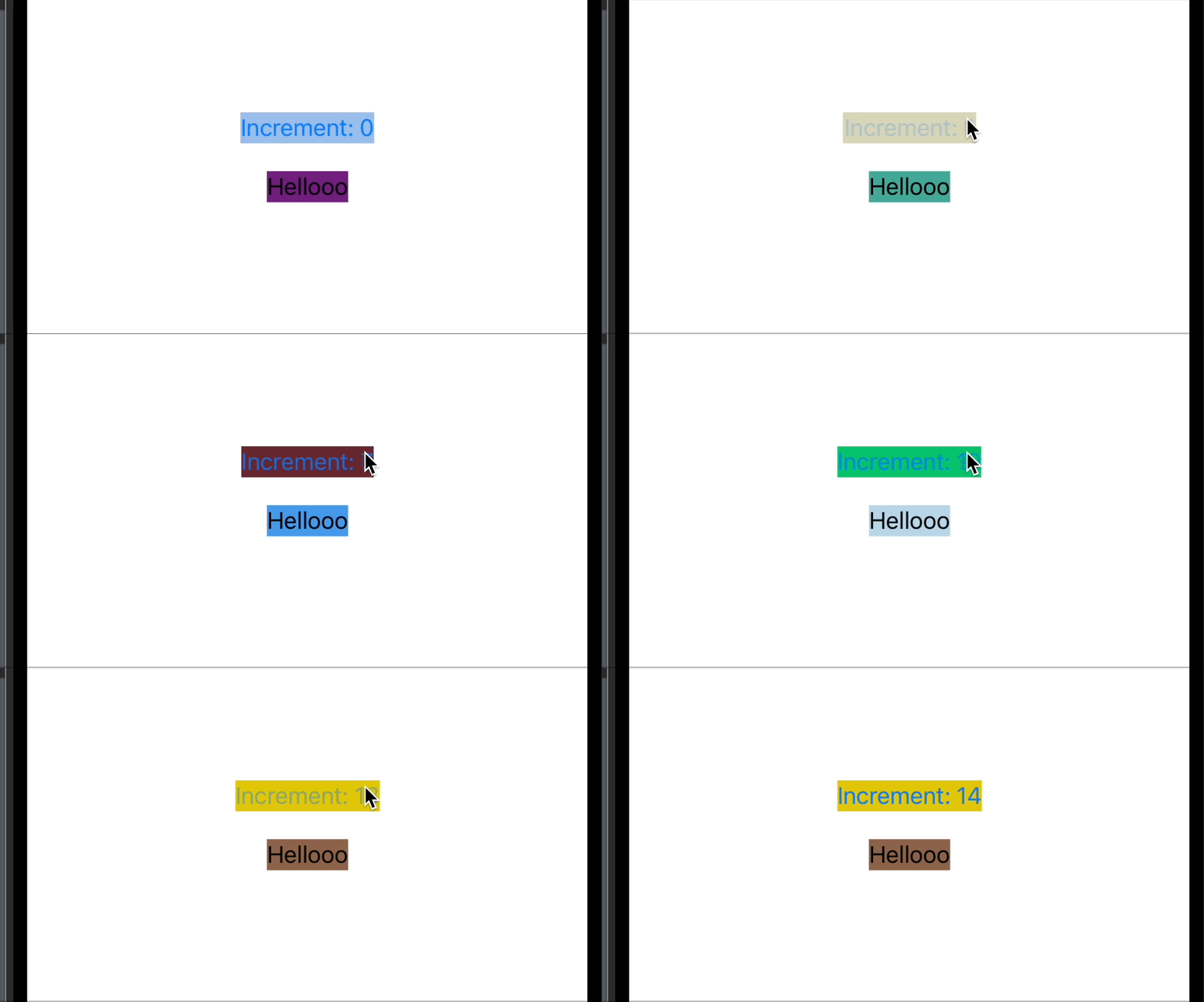
At runtime, SwiftUI sees this:
var body: some View {
    VStack(spacing: 20) {
        Button("Increment: \(value)") {
            value += 1
        }
        .background(Color.random)

        Text("Hellooo")
            .background(Color.random)
    }
}
Look familiar? It's identical to writing everything inline. You made the code look cleaner for humans, but at runtime? Nothing changed, the entire body still re-executes.
Computed properties work exactly the same way.
The Real Solution: Separate View Structs
The fix is simple, extract subviews into their own struct.
struct Counter: View {
    @State private var value = 0
    var body: some View {
        VStack(spacing: 20) {
            Button("Increment: \(value)") {
                value += 1
            }
            .background(Color.random)

            SubView()
        }
    }
}

struct SubView: View {
    var body: some View {
        Text("Hellooo")
            .background(Color.random)
    }
}
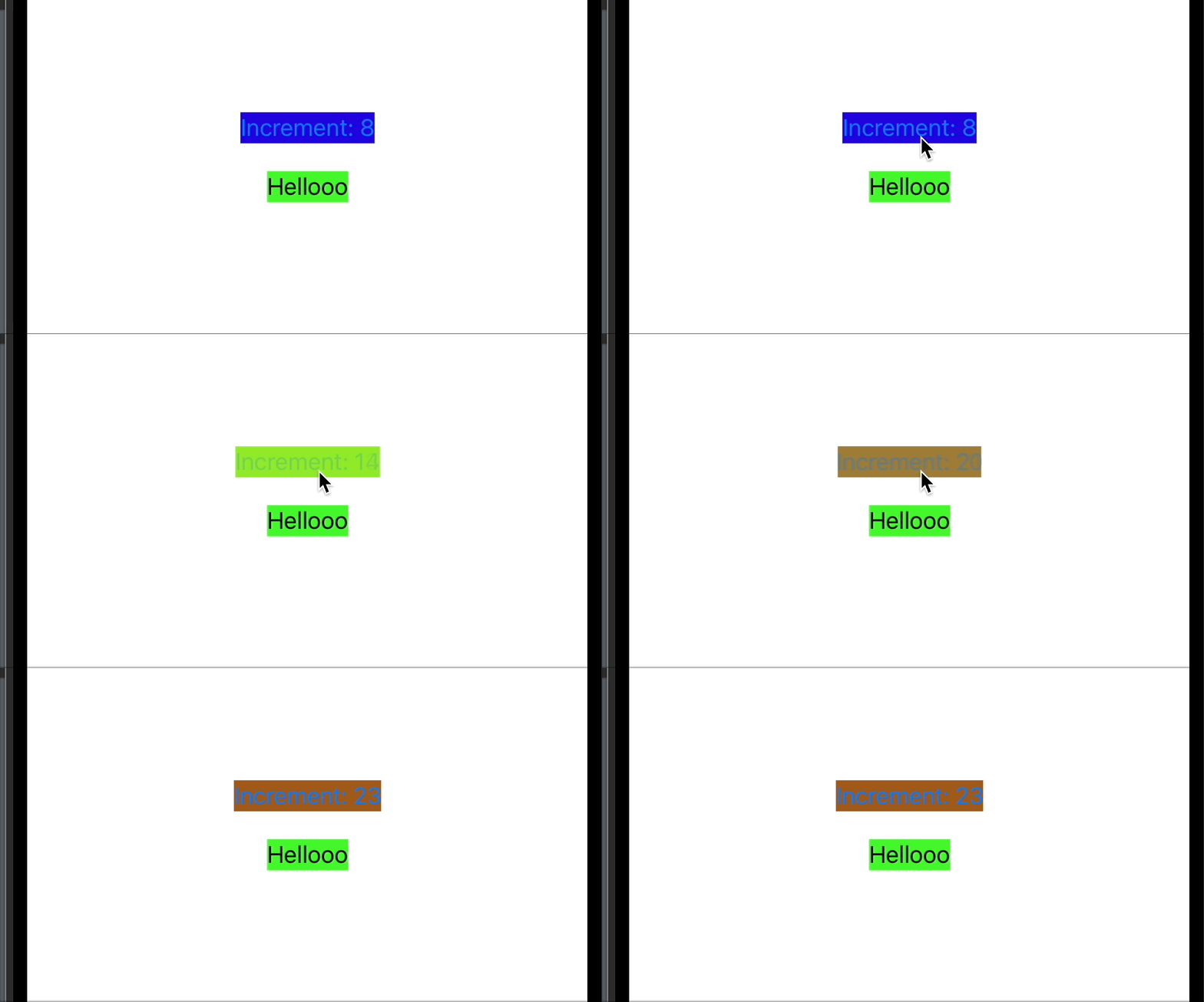
Now when value changes:
Counter's body re-executes → ✅SubView's body does NOT re-execute → ✅
Why? Because SubView has no dependency on value. SwiftUI sees that nothing changed in SubView's inputs, so it skips re-computing its body entirely.
The difference is night and day. In complex views, this is huge.
The Edge Case: When You Need Equatable
You might ask: "When should I implement custom Equatable conformance for my views?"
The answer: when your view body recomputes when it shouldn't.
This commonly happens when you pass closures to views. Sometimes SwiftUI can't compare the closure's identity, which triggers unnecessary recomputation.
At this point, you need Equatable conformance to tell SwiftUI how to properly compare your view. Otherwise? You're good to go.
One last thing if you want to do it at least do it right many developers implement it this way:
struct ContentView: View, Equatable {
    let closure: () -> Void  // This can cause issues

    var body: some View {
        // ...
    }

    static func == (lhs: ContentView, rhs: ContentView) -> Bool {
        return true
    }
}

struct ContentMain: View {
    var body: some View {
        ContentView() // This is wrong
    }
}
This implementation is wrong because SwiftUI doesn't know that ContentView is equatable which can cause problems for SwiftUI while diffing.
Solution is simple just add this modifier .equatable() which tells SwiftUI that this view is equatable:
struct ContentMain: View {
    var body: some View {
        ContentView()
          .equatable()
    }
}
Conclusion
The key to SwiftUI performance isn't magic—it's understanding how the rendering engine thinks.
The rules are simple:
- State changes trigger body re-execution
- SwiftUI diffs the result against the previous body
- Separate structs = separate re-evaluation boundaries
The next time you write a SwiftUI view, take a moment to think: "What happens to this view body when this state changes?" Use the random color trick to verify your assumptions.
You're not just writing views—you're architecting a render tree. Make it efficient.