- Published on
AsyncImage the way I like it
- Authors

- Name
- Omar Elsayed
Introduction
Couples of weeks ago, I was working on a feature where I used AsyncImage to load an image from a url but it was very painful to be honest. You may ask why ? let me tell you…
First of all it’s not clear at all, I used this initializer for the AsyncImage where I had to create a view for each case but what was painful is the fact that it wasn’t clear which case is displayed when.
struct Test: View {
    var body: some View {
        AsyncImage(url: URL(string: "https://picsum.photos/200")) { phase in
            switch phase {
            case .empty:
                Circle()
            case let .success(image):
                image
            case .failure:
                Text("Error")
            @unknown default:
                fatalError("There is a new case for the AsyncImage phase")
            }
        }
    }
}
Basically all I wanted is to have a case for the loading state, you may say .empty is the loading state but it’s not if the url is nil the .empty state is the one that will be displayed, which is confusing to me. Why the .failure isn’t the one that is displayed ?? Very weird api from Apple.
But this is not the only problem the other problem is the fact that AsyncImage doesn’t work well pre iOS 18 when you put it in a LazyVStack.
Basically the image get’s loaded twice when the view is deallocated in the LazyStack which makes the scroll experience very difficult.
So since I didn’t have so much time due the fact that we want to release, we decided to go with kingFisher which to be honest wasn’t the best thing.
First a very high learning curve and I didn’t understand there cashing, I didn’t have time to invistagite where they cache the images. Because when you use a third-party in a large code base, you need to understand everything about it and how it’s going to affect the device memory.
Second of all I didn’t like it because it wasn’t clear also like the AsyncImage and handling the failing state is very annoying in KingFisher.
So What I did in the end, I used KingFisher and fixed the issue for the release. But I didn’t like the code I have and having a very complex third-party library for a very simple thing is annoying to me.
I decide to build my own api which looks like the one we have from SwiftUI, because to be honest I like how it’s called in the view and how simple it’s. But I just changed the loading phases to match my needs and to be clear which phase we are in and when.
And I wanted to add some cherry on the top 🍒, by having different caching policies to match my needs.
- AsyncImage Declaration
- AsyncImageFetcher
- AsyncImageAppSessionCacher
- AsyncImageUseCase
- AsyncImageViewModel
- Conclusion
AsyncImage Declaration
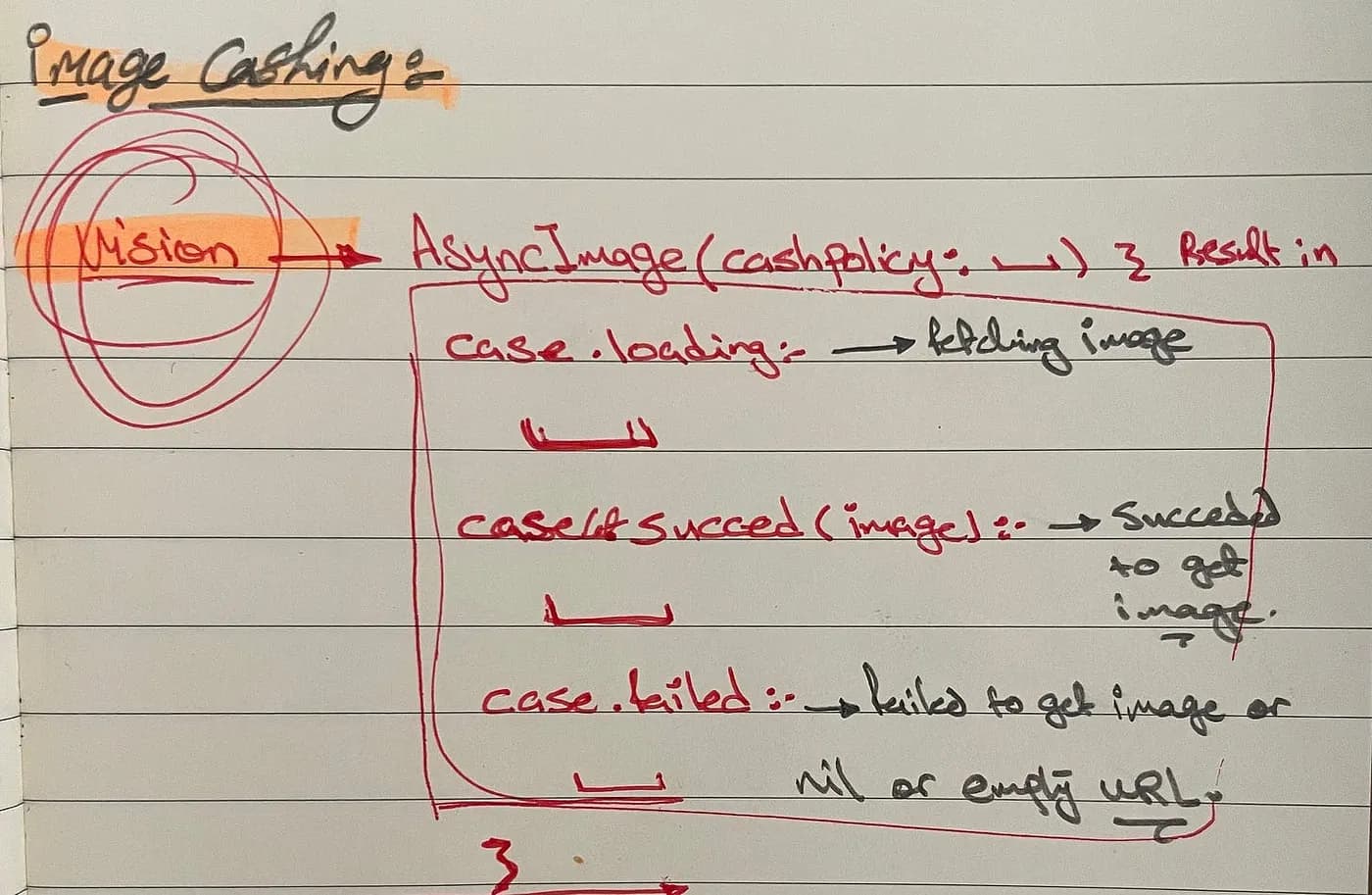
let’s start with the first easy step which is the AsyncImage api declaration. As we saw in the image above we will have two parameters for the AsyncImage api, plus AsyncImage will be a view to be able to call it directly in any swiftUI view.
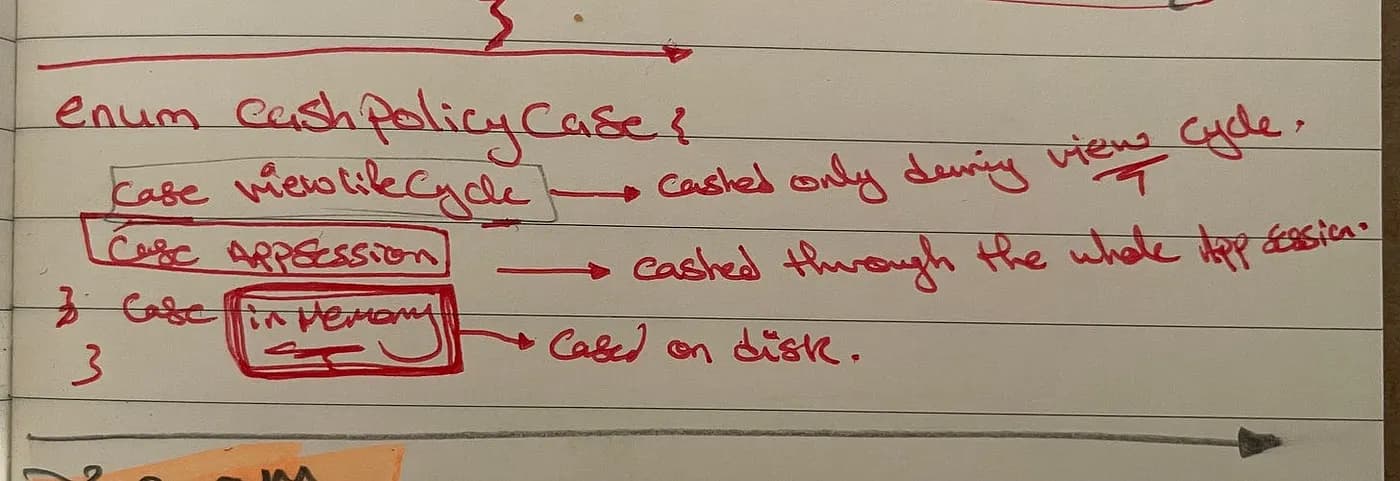
The first parameter will be the caching policy we want for this image, it can be easily presented by this simple enum:
public enum CachingPolicy: Sendable {
    case withViewCycle
    case duringAppSession
}
You may wonder why I have added the Sendable protocol to enum ? this is simply to make the api compatible with swift 6 and it’s data race checks.
NOTE
I didn’t add a case for caching image in memory because to be honest I don’t like the idea of caching image on disk plus I don’t have a scenario for it now. Maybe if one of the people who wants to use this api needs this case, at this point I may add it 😂
The second parameter we will have in the AsyncImage api a closure that takes the loading case as a parameter and returns a view as a result based on the case. So let’s first create the enum for the loading state of the image:
public enum AsyncImageLoadingCase {
    case loading
    case success(Image)
    case failure(AsyncImageError)
}
Now we have all the parameters we need to be able to create the AsyncImage api declaration, so let’s do it:
public struct AsyncImage<Content: View>: View {
    @StateObject private var viewModel: _AsyncImageViewModel = .init()

    private let url: URL?
    private let cachingPolicy: CachingPolicy
    private let contentView: (AsyncImageLoadingCase) -> Content

    public init(cachingPolicy: CachingPolicy, from url: URL?, @ViewBuilder contentView: @escaping (AsyncImageLoadingCase) -> Content) {
        self.url = url
        self.cachingPolicy = cachingPolicy
        self.contentView = contentView
    }

    public var body: some View {
        contentView(viewModel.imageLoadingCase)
            .task {
                await viewModel.fetchImage(cachingPolicy: cachingPolicy, from: url)
            }
    }
}
This api will be used like this:
AsyncImage(cachingPolicy: .duringAppSession, from: imageURL) { phase in
    switch phase {
    case .loading:
        ProgressView()

    case .success(let image):
        image
            .resizable()
            .aspectRatio(contentMode: .fit)

    case .failure:
        Image(systemName: "exclamationmark.triangle")
    }
}
What a nice api 😅? Now let’s implement the hidden parts of the api 👨🏼💻
AsyncImageFetcher
The first part hidden part is where we are going to fetch image from the api, so let’s create AsyncImageFetcher.
import Foundation

struct _AsyncImageFetcher: Sendable {
    private let urlSession: URLSession = .shared

    func fetchImage(at url: URL?) async throws -> Data {
        do {
            guard let url else { throw AsyncImageError.invilaedUrl(url) }
            let (data, reponse) = try await urlSession.data(from: url)
            guard let reponse = reponse as? HTTPURLResponse, reponse.statusCode == 200 else { throw AsyncImageError.invalidResponse }
            return data
        } catch {
            throw AsyncImageError.urlSessionError(error)
        }
    }
}
This is basically how we are going to fetch image, the reason why we handled the error with a do catch block is the fact that we want to throw a specific type instead of the default one.
You may ask why the _AsyncImageFetcher is a struct not a class, the reason is simple, it’s because we can make it a struct 😅, making it a class (reference type) isn’t needed and as a small enhancement we made it struct instead.
The second block we need is the cacher and how we can cache all the images 🤔?
AsyncImageAppSessionCacher
At first when I thought about caching the images, the first thought came to mind is dictionary, key will be the url string and the value will be the image. As a first thought it wasn’t bad but not enough to be honest to be used in large scale apps.
You may ask what is missing ? First having the value as the image isn’t efficient, caching image data is much litter on memory and more efficient. The second issue is the fact that there is no memory management in the dictionary and it will take a lot of time to build one and defiantly will contain issues, because guess what there is nothing perfect in life.
So I searched as I used to do in college (the best skill I learned from it actually 😅) and I found a better solution which is NSCache but as I told you there is nothing perfect in life.
NSCache have it’s own problems, we can summarize them in one statement…old as my grandpa 👴. The value and the key needs to conform to NSObject (class type basically) and either the String type nor the Data type is a NSObject, so how can we solve this problem 🤔?
I found a solution to this problem by wrapping any value type in a reference type that conforms to NSObject and with that the problem is solved, we can use String as the key and Data as the value for the NSCache.
NOTE
Big thanks to johnsundell for this amazing article, the solution was taken from it. https://www.swiftbysundell.com/articles/caching-in-swift/
//
//  AsyncImageCacher.swift
//  AsyncImage
//
//  Created by Omar Elsayed on 22/04/2025.
//

import Foundation
final class _AsyncImageCacher<Key: Hashable, Value>: @unchecked Sendable {
    private let cache = NSCache<CacherKey, CachedValue>()

    func cache(_ value: Value, forKey key: Key) {
        let valueToCache = CachedValue(value: value)
        let keyToCache = CacherKey(key: key)
        cache.setObject(valueToCache, forKey: keyToCache)
    }

    func fetchCachedValue(forKey key: Key) -> Value? {
        guard let cachedValue = cache.object(forKey: CacherKey(key: key)) else { return nil }
        return cachedValue.value
    }

    func removeCachedValue(forKey key: Key) {
        cache.removeObject(forKey: CacherKey(key: key))
    }

    func removeAllCachedValues() {
        cache.removeAllObjects()
    }
}

extension _AsyncImageCacher {
    final class CacherKey: NSObject {
        let key: Key
        init(key: Key) { self.key = key }
        override var hash: Int { key.hashValue }
        override func isEqual(_ object: Any?) -> Bool {
            guard let other = object as? CacherKey else { return false }
            return key == other.key
        }
    }
    final class CachedValue {
        let value: Value
        init(value: Value) { self.value = value }
    }
}
with that we have created our own NSCache that uses any type as the key or value almost 😅. Now the second step is to create an instant of this type to use as our cache.
import Foundation

final public class AsyncImageAppSessionCacher: Sendable {
    public static let shared = AsyncImageAppSessionCacher()
    private let cache = _AsyncImageCacher<String, Data>()

    private init() {}

    public func fetchImageForURL(_ url: URL) -> Data? {
        let urlString = url.absoluteString
        return cache.fetchCachedValue(forKey: urlString)
    }
    public func cacheImage(_ imageData: Data, forURL url: URL) {
        let urlString = url.absoluteString
        cache.cache(imageData, forKey: urlString)
    }
    public func removeCachedImage(forURL url: URL) {
        let urlString = url.absoluteString
        cache.removeCachedValue(forKey: urlString)
    }
    public func removeAllCachedImages() {
        cache.removeAllCachedValues()
    }
}
I think the code doesn’t need explanation so I will keep this part for you…yes you 🫵🏻.
By now you may ask why using the NSCache in the first place ? Good question, let me tell you:
NSCache implements automatic eviction policies that prevent excessive memory usage. These mechanisms will remove certain items when other applications need memory, helping to keep the cache’s memory footprint minimal.
NSCache provides thread-safety by design. You can perform operations like adding, removing, and querying items from multiple threads simultaneously without implementing your own locking mechanisms.
Not enough for you, I don’t care it’s enough for me 😅. Now let’s put the fetching and the caching parts together.
AsyncImageUseCase
The _AsyncImageUseCase serves as the connection point between our ViewModel and the image handling mechanics.
//
//  AsyncImageUseCase.swift
//  AsyncImage
//
//  Created by Omar Elsayed on 22/04/2025.
//

import SwiftUI

struct _AsyncImageUseCase: Sendable {
    private let imageFetcher: _AsyncImageFetcher = .init()
    private let imageAppSessionCacher: AsyncImageAppSessionCacher = .shared
}

// MARK: - Fetch Method
extension _AsyncImageUseCase {
    func fetchImage(url: URL?, for cachingPolicy: CachingPolicy) async throws -> Image {
        guard let url = url else { throw AsyncImageError.invilaedUrl(url) }
        if let cachedImageData = checkCachedImageData(for: url), cachingPolicy != .withViewCycle {
           guard let image = Image(data: cachedImageData) else { throw AsyncImageError.invalidData(cachedImageData) }
            return image
        } else {
            let finalImageData = try await getImageFrom(from: url)
            guard let finalImage = Image(data: finalImageData) else { throw AsyncImageError.invalidData(finalImageData) }
            cacheImage(for: cachingPolicy, finalImageData, url)
            return finalImage
        }
    }
}

// MARK: - Private Methods
extension _AsyncImageUseCase {
    private func getImageFrom(from url: URL?) async throws -> Data {
        return try await imageFetcher.fetchImage(at: url)
    }
    private func checkCachedImageData(for url: URL) -> Data? {
        return imageAppSessionCacher.fetchImageForURL(url)
    }
    private func cacheImage(for cachingPolicy: CachingPolicy, _ image: Data, _ url: URL?) {
        switch cachingPolicy {
        case .duringAppSession:
            imageAppSessionCacher.cacheImage(image, forURL: url!)
        case .withViewCycle:
            break
        }
    }
}
This struct implements the core logic that coordinates fetching and caching based on our defined policies.
The main fetchImage method does the following - first checking if we have a cached version of the requested image if not we get the image from the url by a network request.
When images are successfully fetched, they’re cached according to the specified policy — either persisting throughout the app session or being released with the view’s lifecycle.
Plus we handled all error cases with our custom AsyncImageError types, providing clear failure scenarios for invalid URLs, network issues, or corrupted image data.
Now to the lat part the viewModel.
AsyncImageViewModel
it very simple we have imageLoadingCase as @Published to be able to trigger a view update when we get the image and the fetchImage method which get’s the image using the AsyncImageUseCase fetchImage.
@MainActor
final class _AsyncImageViewModel: ObservableObject {
    @Published var imageLoadingCase: AsyncImageLoadingCase = .loading
    private let imageFetcher: _AsyncImageUseCase = .init()
}

// MARK: - AsyncImageViewModel Methods
extension _AsyncImageViewModel {
    func fetchImage(cachingPolicy: CachingPolicy, from url: URL?) async {
        do {
            let image = try await imageFetcher.fetchImage(url: url, for: cachingPolicy)
            imageLoadingCase = .success(image)
        } catch {
            let asyncError = error as? AsyncImageError
            imageLoadingCase = .failure(asyncError)
        }
    }
}
With that we have an image caching mechanism that doesn’t suck 😂.
Conclusion
If you want to use the api directly just clone this repo and I encourage you to visit the doc I created to know the best practices for this api.
And always create your own api’s don’t settle with what is created, make it in the way you like it. Stay Creative Always 💡
Subscribe for more like this made with ♥️